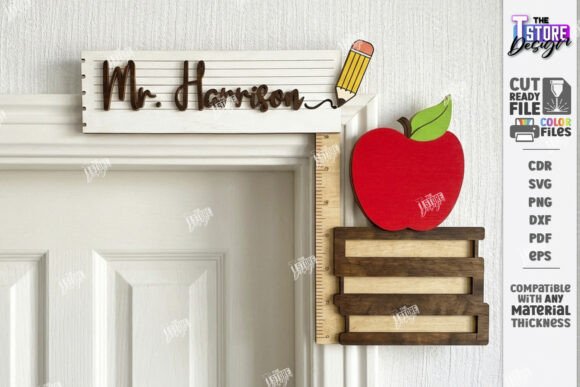
Evaluating Laser Cut Teacher Door Corner Signs for Classroom Customization
Creating a welcoming and organized classroom environment is a priority for educators at the start of every school year. Among the various methods available for personalizing learning spaces, the Teacher Door Corner Sign Laser Cut has emerged as a popular solution for adding a professional, durable, and customized touch to classroom entrances. This approach utilizes digital design files compatible with laser cutting machines to produce physical signage that fits precisely into door frames or corners. For teachers, administrators, and crafters looking to enhance school decor, understanding the capabilities, requirements, and practical applications of this technology is essential for making an informed decision.
Understanding the Product and Technology
A Teacher Door Corner Sign Laser Cut refers to a decorative nameplate or subject identifier designed specifically to be manufactured using a laser cutter. Unlike traditional printed signs made of paper or vinyl, these items are typically cut from materials such as acrylic, wood, or cardstock. The production process relies on vector-based digital files, commonly distributed in formats like SVG, DXF, EPS, PDF, and PNG. These files contain specific instructions for the machine: usually indicated by colored lines where one color (often red) dictates the cut path and another (often black) indicates areas to be engraved.
The appeal of this method lies in its precision and customizability. Because the designs are digital, they can be easily modified to include a specific teacher's name, grade level, or subject area—ranging from Music and Math to Science, Art, Sports, and Language. Once the file is prepared, the laser cutter executes the design with high accuracy, resulting in clean edges and intricate details that are difficult to achieve with manual cutting tools.
Key Benefits for Educational Settings
There are several compelling reasons why schools and individuals might choose this method over conventional signage options. The primary advantage is durability. Signs cut from acrylic or hardwood withstand the wear and tear of a busy school hallway far better than laminated paper. They do not tear, fade easily, or peel off over time, making them a cost-effective long-term investment.
Furthermore, the aesthetic quality of laser-cut signs offers a polished, professional look that elevates the appearance of the classroom. The ability to personalize each sign fosters a sense of ownership and pride for the teacher while helping students and visitors quickly identify specific classrooms. For those who own laser cutting equipment, such as Glowforge or similar desktop models, producing these signs in-house allows for rapid iteration. If a teacher changes rooms or subjects, the digital file can be updated and a new sign produced immediately without waiting for external vendors.
Technical Considerations and File Compatibility
While the end result is often impressive, successfully creating a Teacher Door Corner Sign Laser Cut requires attention to technical details. Users must ensure their cutting machine and software are compatible with the provided file formats. Most packages include a zip archive containing SVG, EPS, PNG, PDF, and DXF files to accommodate different workflows.
A critical consideration involves the software used to operate the laser cutter. For instance, users working with Lightburn software should be aware that SVG file formats can sometimes cause dimension distortions during import. In such cases, it is strongly recommended to use the DXF file format instead, as it generally preserves dimensions more accurately for laser cutting applications. Ignoring this nuance can result in a sign that does not fit the intended door frame corner, rendering the project unusable.
Additionally, users must correctly interpret the layer instructions within the files. Typically, red lines indicate where the laser should cut through the material, while black lines denote engraving tasks. Misconfiguring these settings in the software can lead to incomplete cuts or unintended etching, wasting both time and material.
Ideal Use Cases and Fit
This solution is a strong fit for several specific scenarios. It is particularly valuable for schools with access to fabrication labs or makerspaces. In these environments, staff or student groups can produce signage for the entire building efficiently. It is also an excellent choice for craft entrepreneurs who create personalized gifts for teachers. The ability to offer subject-specific designs (e.g., a music note motif for a band room or an atom symbol for science) adds significant value to the product.
Moreover, for back-to-school preparations where time is of the essence, having ready-to-cut files allows for batch production. A single sheet of material can often yield multiple signs if the layout is optimized, making it efficient for large-scale deployment across a district.
When to Consider Alternatives
Despite the advantages, a Teacher Door Corner Sign Laser Cut is not the universal solution for every situation. Individuals or schools without access to laser cutting hardware will find limited utility in purchasing digital files unless they plan to outsource the cutting to a third-party service, which may negate the cost savings. In such cases, pre-made vinyl decals or printed plastic signs might be more practical and immediate.
Additionally, those unfamiliar with vector graphics or laser operation software may face a steep learning curve. If the user cannot troubleshoot file import issues or adjust power and speed settings on their machine, the project may become frustrating rather than helpful. For one-off needs where a unique, hand-painted, or fabric-based aesthetic is desired, traditional crafting methods might offer more creative freedom than the geometric precision of a laser cutter.
Making the Decision
Deciding whether to invest in these digital designs depends largely on your resources and goals. If you possess a compatible laser cutter and seek a durable, professional, and highly customizable signage solution, the Teacher Door Corner Sign Laser Cut is an outstanding option. It bridges the gap between digital design and physical utility, allowing for endless variations in names and subjects.
However, success relies on preparation. Ensure you have the correct software knowledge, specifically regarding file formats like DXF for Lightburn users, and verify that your machine can handle the chosen material thickness. By evaluating these factors against your specific needs, you can determine if this modern approach to classroom decor aligns with your objectives for the upcoming school year.